This article describes security and privacy failures in a third-party corporate wellness gadget. Names and domains are fictionalized. The open replacement is Presence Hub on GitHub.*
«It's not a bug — it's a feature.» — Corporate release notes, every vendor, every quarter.
«Liberty means responsibility. That is why most men dread it.» — George Bernard Shaw
TL;DR
A corporate «wellness» mmWave tracker landed on my desk. It phoned home to an open API, ranked me on a fleet table, and asked for a spare power outlet. I dumped the flash, walked away from the cloud, and rebuilt the hardware as Presence Hub — local MQTT, SQLite, honest radar physics, on-device TinyML.
The question underneath everything else:
Who owns the device sitting on my desk — me, or someone else's dashboard?
Full forensic detail, MQTT cookbook, and firmware depth below. Skim the narrative through Part 3 — Enough Proof; jump to Part 4 — Presence Hub for the rebuild.
Jump to
- Prologue
- Part 0.5 — Power Strip Lecture
- Part 1 — Threat Model
- Part 2 — Forensic Specimen
- Part 3 — Enough Proof
- Part 4 — Presence Hub
- Part 5 — UDP Discovery
- Part 6 — GPIO Archaeology
- Part 7 — Mac Daemon
- Part 8 — Firmware
- Part 9 — Radar 101
- Part 10 — Gestures
- Part 11 — TinyML
- Part 12 — Evolution
- Conclusion
- Epilogue
- Appendix A — MQTT
- Appendix B — Debug
Prologue: The Package Arrives (Norton Commander for the Soul)
In the corporate wellness industry there is a razor-thin line between caring for an employee and full-blown Orwellian surveillance. Sometimes that line is not crossed — it is run over by a tank painted «ergonomic beige» and marketed as an attention antivirus.
It started innocently. A friendly direct message on a spring afternoon:
«Hi, please send me your mailing address — I want to send you a small package.»

Where the story starts — a spring DM, anonymized. Small parcel is corporate for prototype surveillance with layer lines.
The post office experience was already a metaphor. The courier apparently could not be bothered to walk to the door or leave a slip; the parcel sat at the depot until I collected it myself.
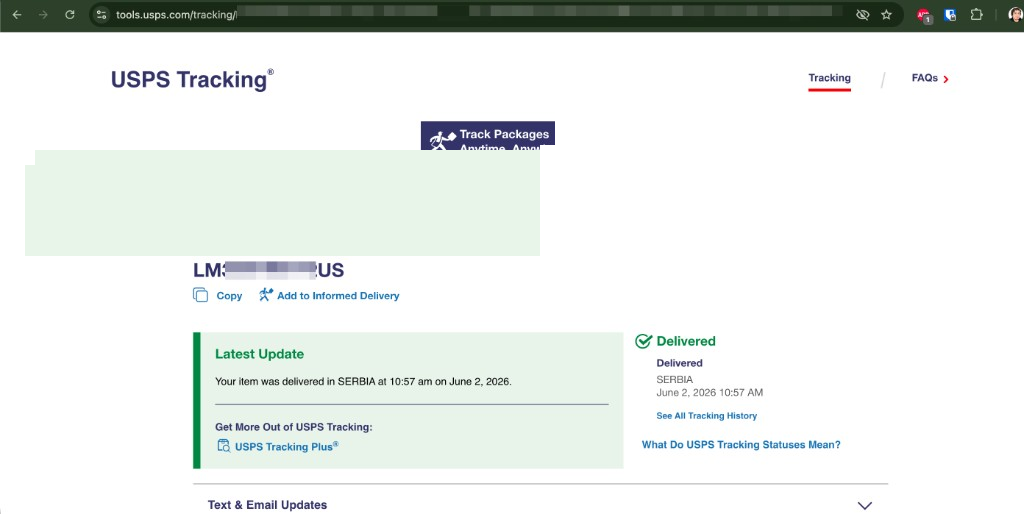
Delivered, SERBIA — the corporate wellness prototype clears customs faster than their GDPR story.
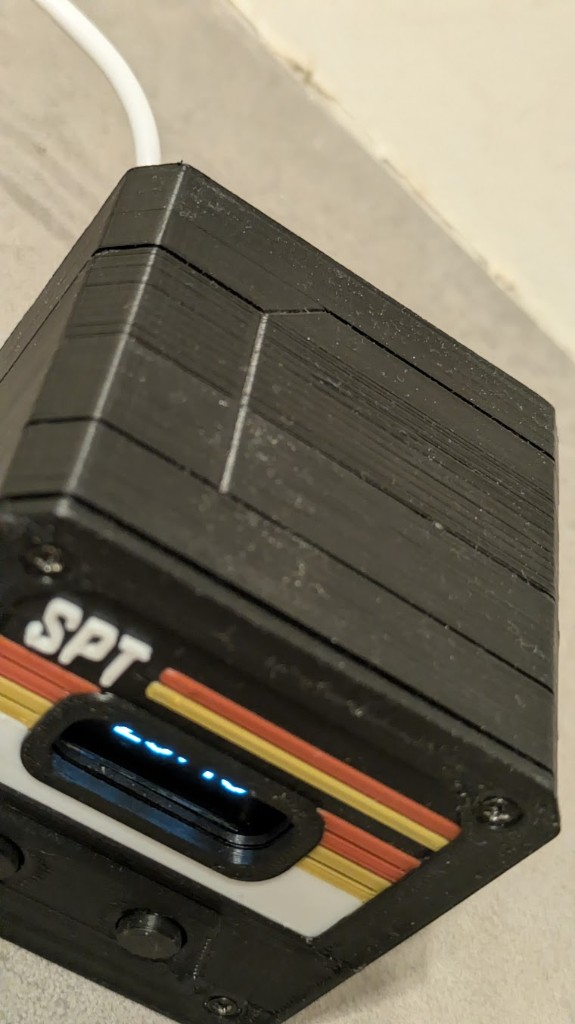
Layer lines, diagonal seam, four screws — industrial design tax still zero.
Plug it in. First-run wizard on the OLED: Wi-Fi SSID, Wi-Fi password, pick a timezone (I chose Europe/Belgrade — sensible for Serbia, wrong city label on their dashboard later). That was the whole onboarding. No manual. No «here is your employer dashboard». No explanation of what the numbers on the screen meant.
The gadget just sat there: cryptic counters, mode toggles I did not ask for, a clock that lied — wrong wall time, daylight saving ignored. I am an engineer shipping AI test infrastructure and real deliverables, not a desk-toy babysitter. It collected dust while I worked.
Then the question arrived, quietly and insistently: what is it sending, and to whom? I did not start with a screwdriver. I started on the network — same LAN, watch the wire, save pcaps, replay with scripts. Only after traffic proved the story did I crack the enclosure and plug in USB. The forensic timeline is Part 2 — Forensic Specimen.
The corporate pitch on their product website — when I finally read it — sounded almost empathetic:
- Monitor your deep-work blocks.
- Receive healthy break reminders.
- Rest assured: no cameras, no microphones — just a tiny, harmless radio-wave sensor that uses radio waves to understand who is sitting in front of it.
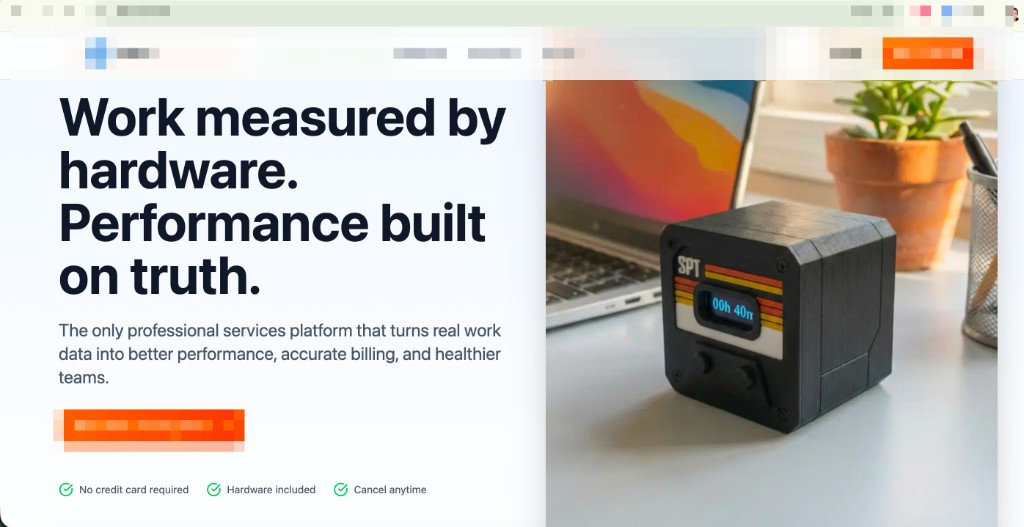
Performance built on truth. Healthier teams. Hardware included — anxiety sold separately.
Performance built on truth — if «truth» is an open API, a MAC address, and a fleet table that ranks your bladder breaks. Healthier teams — like a gym that bills you for steps to the toilet and calls it ergonomics. They had the copy; I had Wireshark. Guess which one lied less.
Reality disagreed — once I could see their dashboard and cross-check the wire:
- I had set timezone on the device. The OLED clock was still wrong. Their admin UI agreed the unit was confused — and still phoned home with HTTP 200.
- Activity logs showed a curious gap from 17:00 to 18:00 — precisely when I was at my desk, quietly and intensely coding. Not pacing. Not vibing. Working.
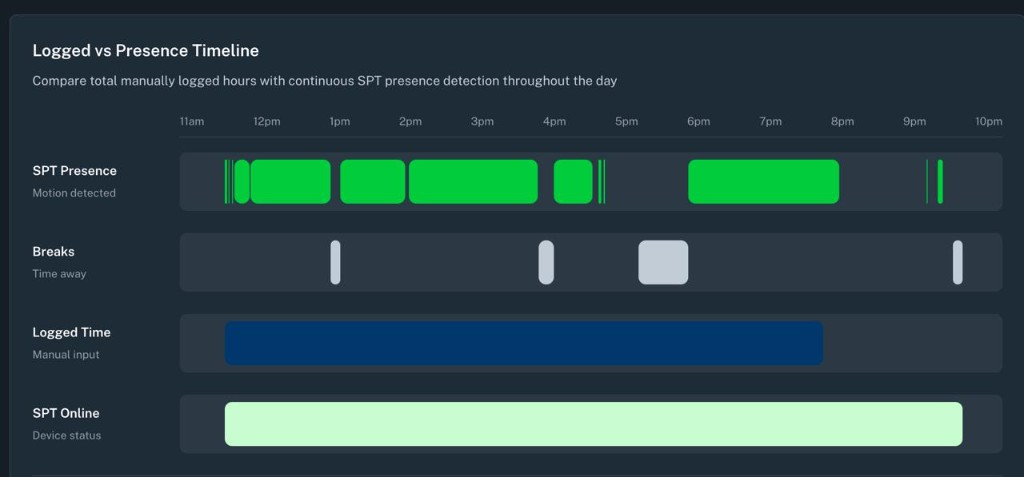
Logged vs Presence Timeline: device online, manual log through 20:00 — but motion «presence» vanishes for most of the 17:00 hour while I was coding.
- The gadget did not track focus. It tracked coarse motion and noise, then uploaded the interpretation to their cloud.
They wrote back: great feedback, this is a new prototype we plan to sell, testing phase, just leave it on your desk collecting data, left button resets time, five presses hard-resets, right button switches display modes, we'll fix timezone on the dashboard soon, try hard-reset and set timezone to Berlin on the device.
Sure. I'll get right on that — right after I finish the UI test suite for Xavier and the auto-AI crash-analysis agents that actually help my job, not a leaderboard of bladder breaks.
Part 0.5: The Power Strip Lecture — Survival vs. «Wellness»
A week later:
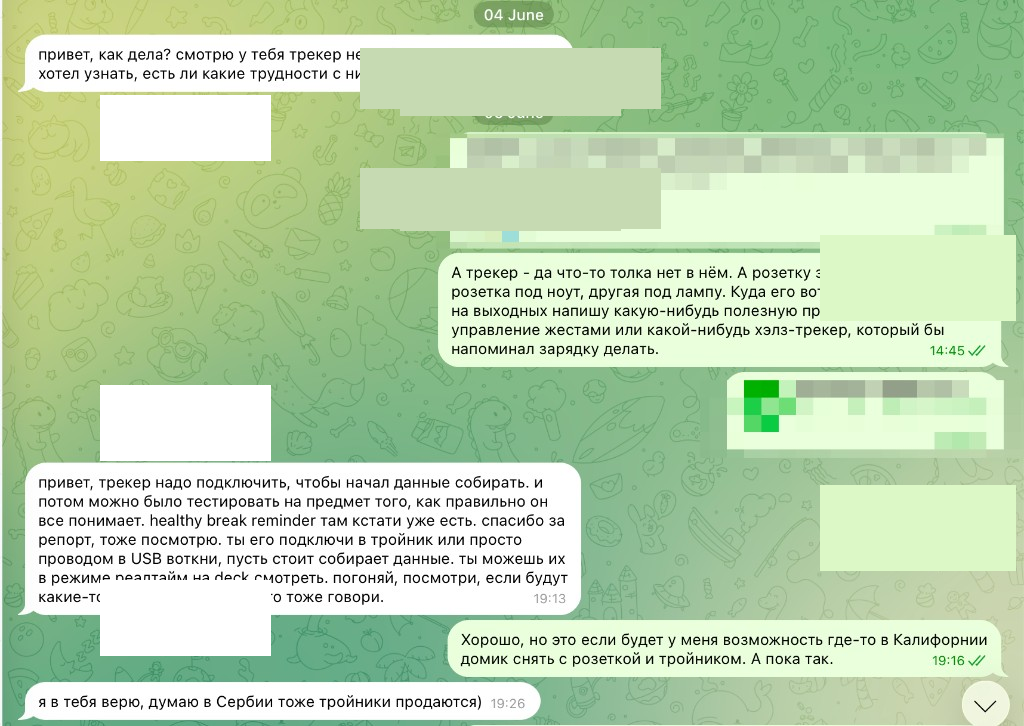
The corporate reply: plug it into a power strip. My reply: California sockets or my own firmware.
«Hi — your tracker wasn't online yesterday or today. Any trouble with it?»
«All good, we're working. Raised UI tests this week, building auto-AI failure analysis so agents fix flaky tests themselves. The tracker — yeah, it's off. It eats a power socket. I have one outlet for the laptop, one for the desk lamp. Where do I plug your toy? And why should I? On the weekend I'll probably flash something useful — gesture media control, a health nudge that reminds me to stretch, **my* firmware.»*
The reply was patient, corporate, and completely deaf:
«You need to plug it in so it collects data. Then we can test whether it understands you correctly — healthy break reminders are already there. Plug it into a power strip or USB, leave it running, watch realtime on the dashboard.»
I answered the only way that felt honest:
«Fine — as soon as I rent a house in California with a spare outlet and a power strip. Until then, no.»
«I believe in you — I'm sure they sell power strips in Serbia too :)»
And there it was. The full insult compressed into one emoji.
What actually helps a remote engineer be productive is not a mmWave snitch on a stick. It is modern hardware (neural accelerators help). A comfortable workspace — home or coworking — that a remote-first company could fund instead of surveillance cosplay. Above all: income that does not force you to calculate whether you can afford a €3 power strip to feed someone else's data pipeline while you're buying second-hand trousers for your kid and rotten discount food to survive the month.
«But without violating personal boundaries» — should I strap it to a dog's collar? This thing literally logs how many times I walked away to pee. Work is measured in deliverables, not chair time. Respect is not «no money but hold on» plus a mandatory desk pet.
«Privacy is preserved» — especially when data flows freely to anyone on the internet with zero authentication. That is not privacy. That is negligence wearing a yoga mat.
Why I did not «just say no» on day one — Refusing a «gift» tracker is not friction-free. Remote work already means proving you exist. A prototype phase sounds reasonable: we're testing, leave it on the desk. Saying no reads as not-a-team-player — especially mid-sprint on real deliverables. I gave polite feedback first. I unplugged when the power-strip lecture arrived.
I work from Novi Sad — Serbia, not an EU member, but with an EU adequacy decision since 2023 and a ZZPL that tracks GDPR closely. I am not a random hobbyist flashing boards for sport: I am an engineer under a privacy framework that should have protected my home office. It did not — because the vendor stack ignored Art. 32 before I ever opened esptool.
Vendor Medium vs measured — Claimed: edge AI saves workers. Measured: Radar fail + HTTP 200. Claimed: privacy-first. Measured: open API, MAC-as-ID, public fleet table.
This is the thread some of us still call «a dialogue about losing meaning and footing.» Under the sympathetic pitch: my body as radar samples, focus scores in an admin UI that labeled the unit Living Room SPT while it sat in my home office.
Months later the same silicon starred in a vendor Medium story about «AI on a chip saving workers.» I had already lived the other side — flash dumps, serial logs, fleet tables.
That anger was not abstract. I was being watched without meaningful consent.
So I stopped being a passive user and became a forensic investigator — engineer habits, not sysadmin cosplay. Network first, flash second: read the EEPROM like it's 1995 — boot Norton Commander on the family 386, hit TURBO, copy the game to RAMDISK, trust the floppy only after — then rebuild firmware that answers to me. Back then the monster under the bed was COMMAND.COM; in 2026 it sits on the desk and asks for a USB port.
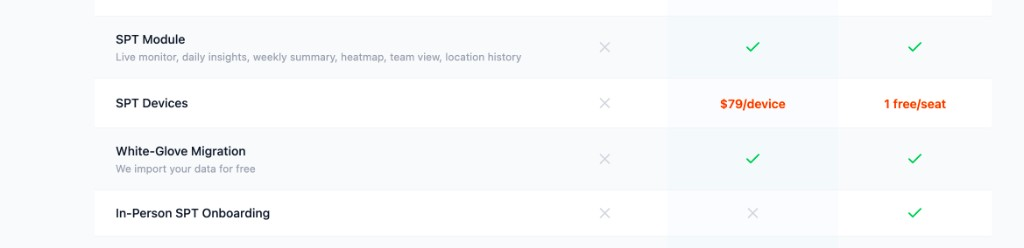
The product sheet: live monitor, team view, location history — wellness as a subscription tier.
Part 1: Threat Model — Law, Borders, and Whose Desk Is This?
Before I touch esptool, the legal and moral premise was rotten. (GDPR/ZZPL detail: Part 0.5 — Power Strip Lecture.)
The gadget micro-managed physical presence — seat-time, not deliverables.
In short: no lawful basis, no security, no erasure — complaint-ready under Poverenik or any EU DPA. The legal thread and the corporate reply are in Part 0.5 — Power Strip Lecture.
Part 2: Forensic Specimen — Reading the Flash Like It's 1995
Technical deep dive from here through Part 11 — TinyML — narrative resumes in the Conclusion.
Order of battle: LAN traffic and HTTP replay before opening the case. USB and flash come after the network tells you where to look.
Step zero on the bench: do not brick the evidence. In the 90s you copied AUTOEXEC.BAT to a floppy before running the thing that might delete C:\. Same ritual: full flash dump before experiments. Stock firmware is ground truth when marketing lies.
Technical timeline (that summer, stock firmware v1.0.7, admin name Living Room SPT):
| # | Step | Tool / outcome |
|---|---|---|
| 1 | Network | capture_traffic.sh / tshark → HTTPS to vendor API host |
| 2 | HTTP replay | curl + OpenAPI → no auth on track endpoints |
| 3 | USB ID | Open enclosure; detect_device.sh → CP2102, ESP32-D0WD-V3 |
| 4 | Preserve flash | dump_firmware.sh → 4 MB .bin + partition table |
| 5 | Strings | strings → API paths, plaintext Wi-Fi credentials in NVS |
| 6 | Serial | monitor_serial.sh → Radar fail + HTTP 200 |
| 7 | GPIO | Boot pin map; later GPIO probe → buttons 18/5 |
Hardware baseline (boring — scandal was never the silicon):
| Component | Interface | Notes |
|---|---|---|
| ESP32-D0WD-V3 | USB-UART (CP2102) | Dual-core, Wi-Fi/BT |
| HLK-LD2410C | UART | 24 GHz mmWave presence radar |
| SSD1306 OLED | I2C @ 0x3C | 128×64 |
| 2× tactile buttons | GPIO | Active LOW (discovered later — PCB had no silkscreen) |
Network capture — capture_traffic.sh
This is where I started — before opening the case.
Multi-mode: interfaces | raw (pcap) | live | mitm | mitmdump | analyze.
Live decode:
# scripts/service/capture_traffic.sh live en0 'host api.vendor.example'
tshark -i "$IFACE" -f "$FILTER" -V -l 2>&1 | grep -E --line-buffered \
    "HTTP|Host:|GET |POST |Authorization|TLS|DNS|MQTT" || true
Analyze saved pcap — HTTP URIs, DNS, TLS SNI, MQTT topics:
tshark -r "$FILE" -Y "http.request" -T fields \
    -e ip.src -e http.host -e http.request.uri -e http.authorization
mitmdump uses mitm_addon.py — pretty JSON + highlight auth/MAC fields:
def request(flow: http.HTTPFlow) -> None:
    print(f">>> {flow.request.method} {flow.request.pretty_url}")
    body = flow.request.content.decode("utf-8", errors="replace")
    parsed = json.loads(body)  # when JSON
    print(json.dumps(parsed, indent=2))
Stock telemetry was bare JSON over HTTPS — but without meaningful client authentication:
{
  "mac_address": "XX:XX:XX:XX:XX:XX",
  "s_energy": 10,
  "s_dist": 30,
  "m_energy": 0,
  "m_dist": 0,
  "presence_min": 0
}
Identity was the hardware MAC string — spoofable, guessable, not authentication. (Shapes in Evidence pack below.)
Detect and identify — detect_device.sh
Only after the wire told me enough — four screws out, faceplate off, USB in.
Inside: a prototype desk gadget — rough FDM 3D-printed enclosure with zero post-processing (no dichloroethane smoothing, no shame, no industrial design), a 128×64 OLED, two tactile buttons, and a 24 GHz millimetric-wave radar module.
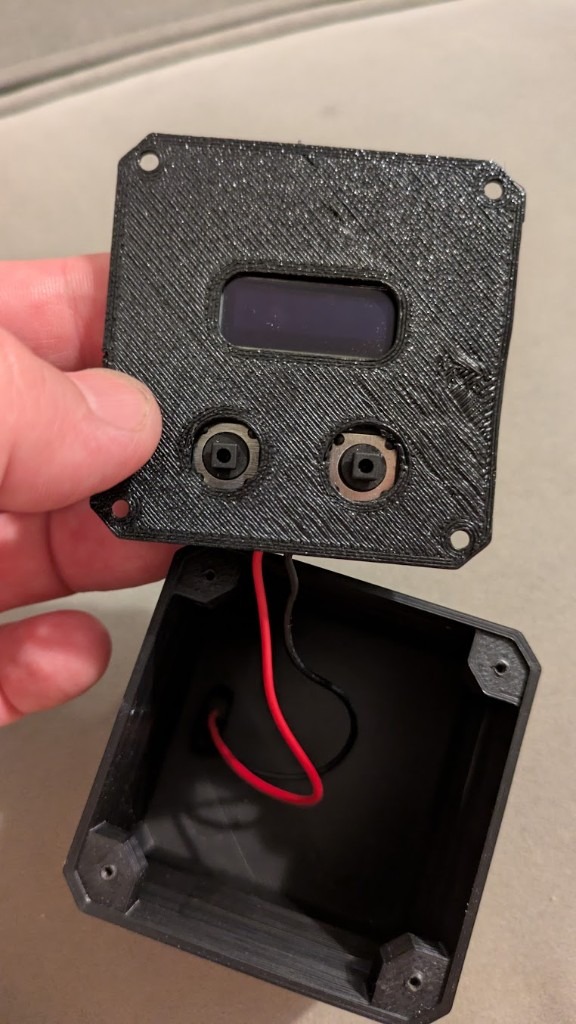
Four screws out — faceplate in hand, hollow box underneath. FDM honesty, no industrial design tax.
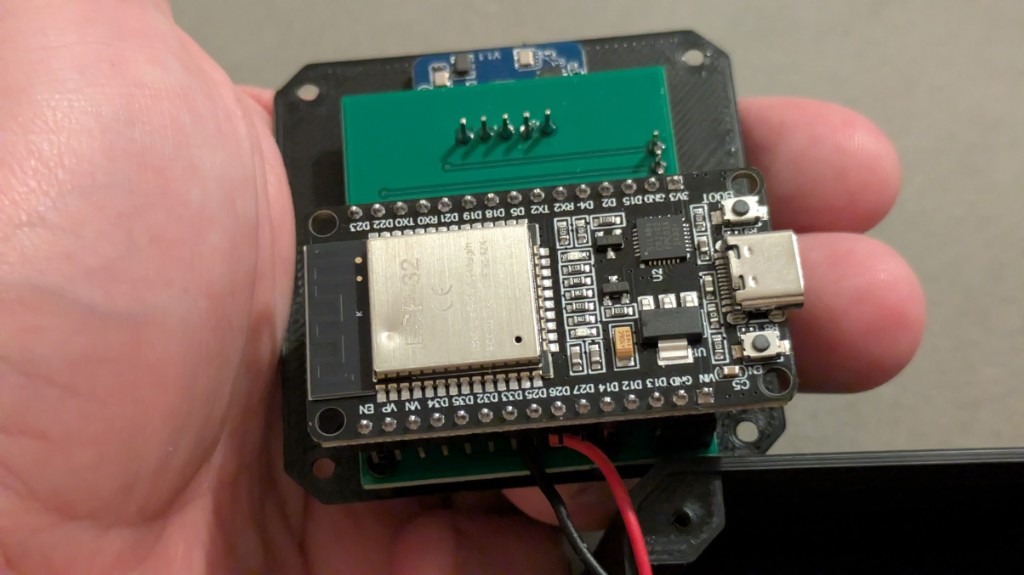
ESP32-D0WD, LD2410-class radar, corporate firmware still intact — bench photo from step 3 in the timeline above.
Finds the first USB serial port (CP2102, CH340, FTDI, …), runs esptool:
# scripts/service/detect_device.sh
find_port() {
    ports=$(ls /dev/cu.* 2>/dev/null | grep -i -E "usb|uart|ch34|cp21|ftdi|wchusb" || true)
    echo "$ports" | head -1
}
PORT=$(find_port)
echo "Detected port: $PORT"
"$ESPTOOL" --port "$PORT" chip_id
"$ESPTOOL" --port "$PORT" flash_id
Typical output: ESP32-D0WD-V3, Detected flash size: 4MB.
Full flash dump — dump_firmware.sh
Reads flash at 921600 baud, saves dumps/firmware_YYYYMMDD_HHMMSS.bin, dumps partition table, parses entries:
FLASH_SIZE=$(esptool flash_id | grep -oE "[0-9]+MB" | head -1)
case "$FLASH_SIZE" in
    4MB) SIZE_HEX="0x400000" ;;
esac

esptool --port "$PORT" --baud 921600 \
    read_flash 0x00000 "$SIZE_HEX" "$DUMP_FILE"

esptool --port "$PORT" read_flash 0x8000 0xC00 "$PART_FILE"

# Embedded Python walks 32-byte partition entries (magic 0xAA 0x50)
# Prints: Name, Type, Offset, Size → nvs, otadata, app0, spiffs, ...
Restore stock firmware (for researchers): esptool write_flash 0x0 dumps/firmware_*.bin
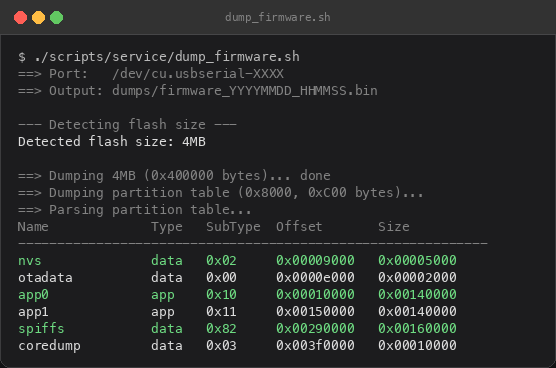
Illustrative dump_firmware.sh output — typical ESP32 OTA layout (nvs, app0/app1, spiffs).
Strings archaeology
strings dumps/firmware_*.bin | grep -iE 'api\.|http|/v1/|Authorization|wifi|ssid'
Yielded API paths, auth header placeholders, plaintext Wi-Fi SSIDs in NVS. Convenient storage ≠ secrets vault.
Live serial monitor — monitor_serial.sh
Colorized Python harness — logs to logs/serial_*.log, highlights fail in red, HTTP/MQTT in cyan, Wi-Fi secrets in green:
# scripts/service/monitor_serial.sh (embedded Python)
def colorize(line):
    lower = line.lower()
    if any(k in lower for k in ["error", "fail", "fault", "panic"]):
        return RED + line + RESET
    if any(k in lower for k in ["http", "mqtt", "connect"]):
        return CYAN + line + RESET
    if any(k in lower for k in ["wifi", "ssid", "password", "token"]):
        return GREEN + line + RESET
    return line
Stock boot (representative):
WiFi connected: <SSID>
Firmware v1.0.7
Device name: Living Room SPT
Radar fail
HTTP POST 200
Radar fail + HTTP 200 — dashboard «presence» while sensor blind. Presence Hub logs honestly.
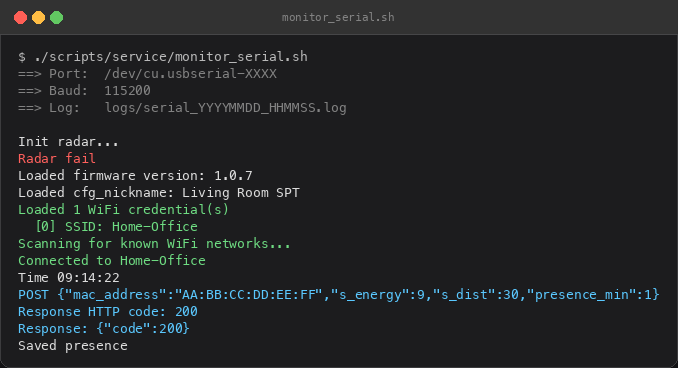
Illustrative monitor_serial.sh session — Radar fail and HTTP 200 on the same boot (fictional SSID/MAC).
API autopsy — when curl returns 200
First shock: not hacking — curl returning 200.
| Finding | Impact |
|---|---|
| POST /v1/track without auth | Write presence for any MAC from the internet |
| OpenAPI at /openapi.json | Full schema published |
| GET /v1/leaderboard | Fleet nicknames — Office SPT, Main Desk, … |
| Per-MAC history | Desk patterns if you guess MAC |
| OTA on public S3 | Firmware bucket visible |
The open GET /v1/leaderboard response listed my nickname at rank #2 in the fleet. Wellness washing as gamified surveillance.
Employer dashboard (separate stack — API Gateway + Cognito SSO):
ESP32 ──► vendor device API (telemetry, wide open)
              ▼
        HR dashboard («live monitor», «Belgrade» — from ``Europe/Belgrade`` TZ, not GPS)
              ▲
Employee browser ──► API Gateway + JWT
Timezone-as-GPS: no satellite — timezone string from NVS rendered as city. I live in Novi Sad; the device only had Europe/Belgrade in NVS. On my own unit I changed the timezone to Asia/Pyongyang; the dashboard obediently showed Pyongyang Office — proof the «location» was configuration theatre, not telemetry.
Walking the holes: The OpenAPI is not decoration — it is a map. Public fleet table — nicknames and ranked seat-time for desks that are not yours. IDOR on employee IDs — increment /employee/{id} and receive display names, tracker MACs, timezone strings; no hardware guessing, no stolen browser session. MAC-bound history — any address copied from the fleet table opens /v1/tracker/{mac}/history. Unauthenticated write path — POST /v1/track accepts payloads for MACs you never paired. Ordinary HTTP tools against the same endpoints the devices use — not a secret exploit chain, not malware. That is the scandal: a product sold to enterprises under «privacy», «security», and «personal boundaries» — wellness copy on the landing page — backed by a telemetry sink that treats any internet client as trusted. For a home-office worker under EU-adequacy law, that is not a Tuesday patch; it is security theatre with your kitchen in frame.
The employer dashboard (API Gateway, Cognito SSO, JWT in the browser) is a second failure mode on the same product story: HR «live monitor» marketed as the controlled, consent-aware surface — while the device API already published the fleet and accepted forged MACs. Garnish on an open buffet.
Appendix — Evidence pack (redacted)
Representative shapes only — hosts and names removed.
OpenAPI fragment (public /openapi.json):
{
  "paths": {
    "/v1/track": { "post": { "security": [] } },
    "/v1/tracker": { "post": { "security": [] } },
    "/v1/leaderboard": { "get": { "security": [] } },
    "/v1/tracker/{mac}/history": { "get": {} }
  }
}
Stock POST body (device → cloud):
{
  "mac_address": "XX:XX:XX:XX:XX:XX",
  "s_energy": 10,
  "s_dist": 30,
  "m_energy": 0,
  "m_dist": 0,
  "presence_min": 0
}
Response: HTTP/1.1 200 OK — no Authorization header required.
Leaderboard row (redacted nicknames):
[
  { "rank": 1, "nickname": "Office ***", "presence_min": 412 },
  { "rank": 2, "nickname": "Living ***", "presence_min": 287 }
]
IDOR employee record (increment id — fields only):
{
  "id": 42,
  "display_name": "[REDACTED]",
  "tracker_mac": "XX:XX:XX:XX:XX:XX",
  "timezone": "Europe/Belgrade"
}
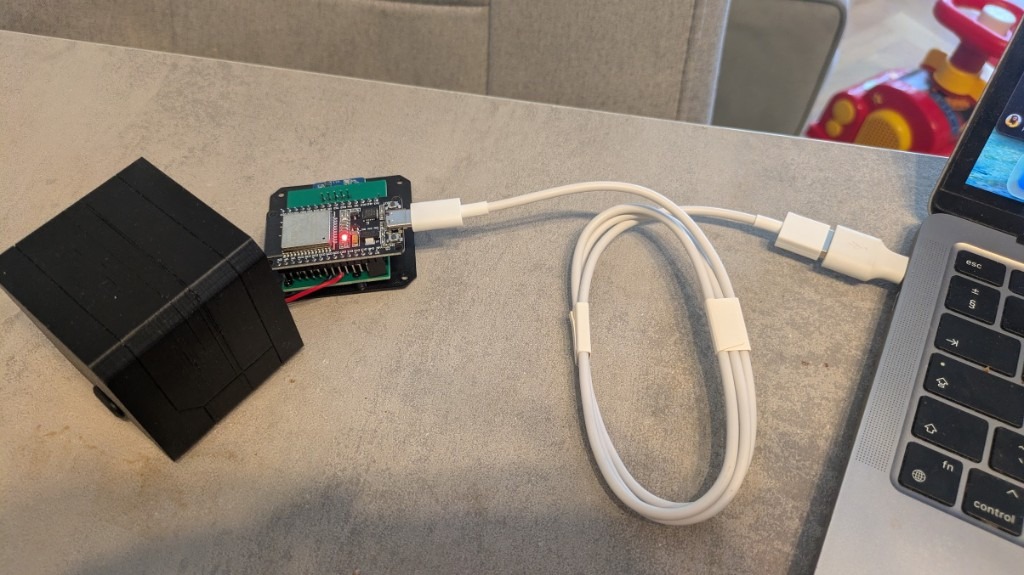
Forensics bench: stock firmware out, esptool in, 3D-printed shell optional.
Part 3: Enough Proof — Then I Left
I walked other people's records through the holes above — fleet nicknames, employee rows, MAC histories — enough to see the system could not tell my home office from a lab bench. Proving the write path on my MAC alone was sufficient for the thesis; I did not vandalise anyone else's telemetry. Fake timezone, junk telemetry, HTTP 200. Same JSON schema, no Authorization header. If the backend cannot tell garbage from a keyboard, it cannot tell an attacker from a colleague.
What I ship publicly is Presence Hub — the replacement, not an attack kit.
Then I severed my device from their cloud, wiped the flash, and built firmware that answers only to my LAN.
Part 4: Presence Hub — Liberation Architecture
Ownership thesis in one line: the ESP32 on my desk runs my firmware, talks to my Mac, stores my logs. No fleet table. No employer view.
I wiped flash and wrote Presence Hub: ESP32 firmware (PlatformIO) + Python asyncio daemon on macOS. Zero vendor API. Zero employer dashboard. My LAN, my SQLite, my rules.
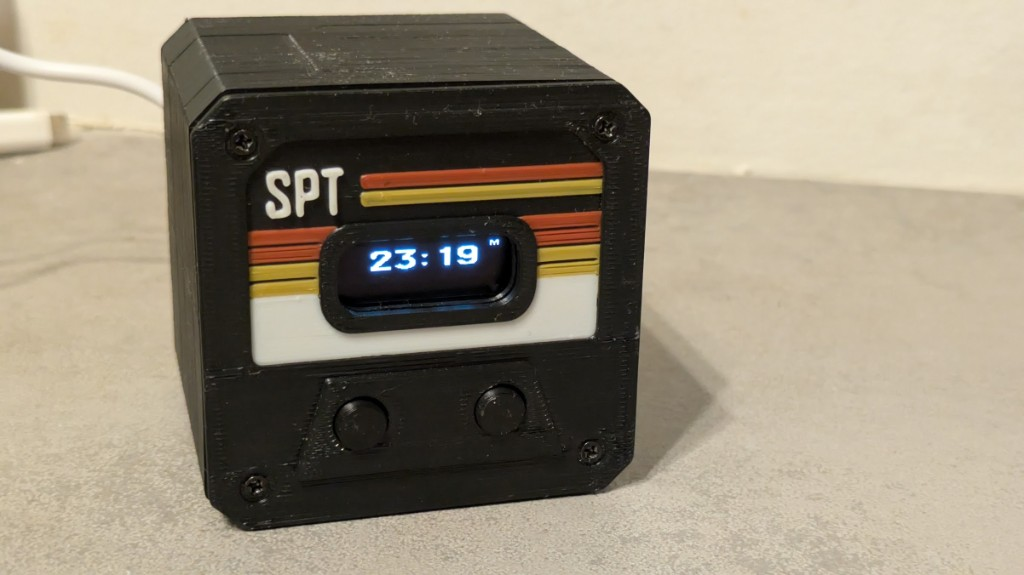
Same crooked enclosure — different firmware. Clock and mode badge from the Mac daemon, not the vendor cloud.
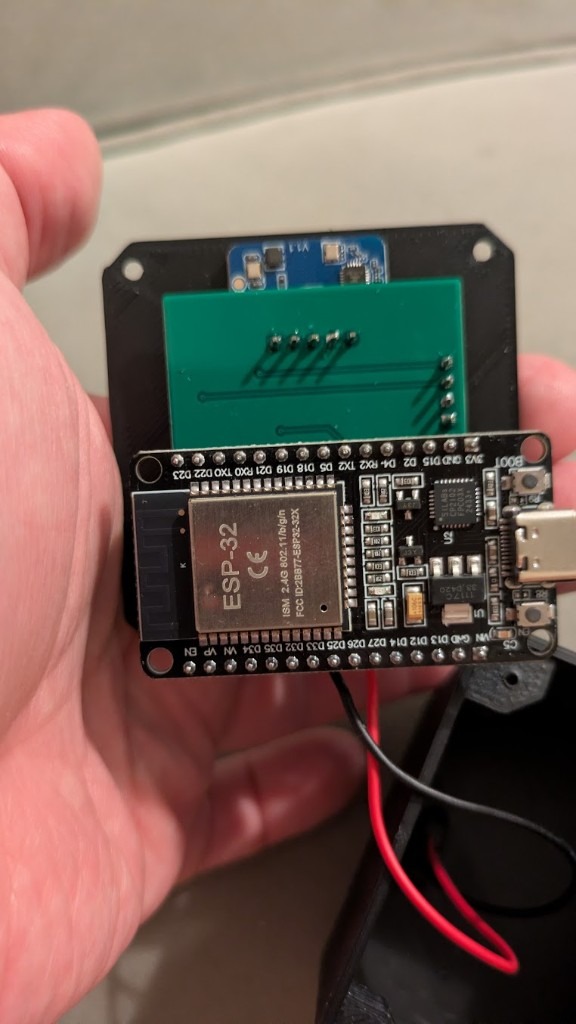
Same silicon. Different owner. GPIO map mine, MQTT topic mine.
Principles I carried from the anger:
- Local-first — Mac is optional infrastructure, not a surveillance landlord
- Offline honesty — LittleFS event log; no fake sync when hub sleeps
- Physics over marketing — one radar axis; sleep charts say «estimate»
- Documented fallback — heuristics before you train; weights in repo
| Vector | Stock stack | Presence Hub |
|---|---|---|
| Telemetry | Vendor cloud API | MQTT on Mac (hub/*) |
| Dashboard | Employer leaderboard | SQLite + Chart.js localhost |
| Hub address | Hard-coded / vendor DNS | UDP discovery — no fixed Mac IP |
| «AI wellness» | Opaque thresholds | Documented heuristics → TinyML |
| OTA | Vendor S3 bucket | LAN OTA from your daemon |
Stack:
LD2410C → ESP32 firmware → MQTT (LAN) → Python daemon → SQLite / Web / Telegram
     ↓
OLED + buttons + LittleFS offline log
Why MQTT on the Mac, not REST on the chip?
- Pub/sub fits radar streams, display push, config — no HTTP server on 320 KB RAM.
- PubSubClient is small; stock FW already abused HTTPS on ESP32.
- mosquitto_sub + sensor log UI = transparency by design.
Trade-off: Mac asleep → Telegram/Spotify pause; ESP32 still journals and syncs later. No fake cloud illusion.
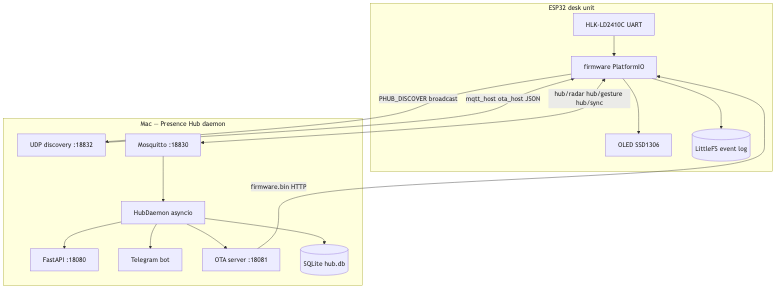
Figure: Presence Hub — device firmware, UDP discovery, LAN MQTT, Python daemon, local SQLite. No vendor cloud in the loop.
Part 5: UDP Discovery — DHCP Is Not Your Friend
Early builds hard-coded the Mac's LAN IP. DHCP reassigned it; MQTT died; I aged five years in one afternoon.
Current flow:
- ESP32 broadcasts PHUB_DISCOVER on UDP port 18832.
- Mac daemon replies with JSON: mqtt_host, mqtt_port, ota_host, ota_port.
- ESP32 caches endpoints in NVS (Preferences namespace phub).
- After 3 failed MQTT connects, cache clears and discovery runs again.
Firmware side (simplified):
static const char *DISCOVER_MAGIC = "PHUB_DISCOVER";
// ...
udp.beginPacket(IPAddress(255, 255, 255, 255), DISCOVERY_PORT);
udp.write(reinterpret_cast<const uint8_t *>(DISCOVER_MAGIC), magicLen);
udp.endPacket();
Mac daemon (discovery.py):
DISCOVER_MAGIC = b"PHUB_DISCOVER"

def datagram_received(self, data: bytes, addr: tuple[str, int]) -> None:
    if data.strip() != DISCOVER_MAGIC:
        return
    lan_ip = get_lan_ip()
    payload = json.dumps({
        "mqtt_host": lan_ip,
        "mqtt_port": MQTT_PORT,
        "ota_host": lan_ip,
        "ota_port": OTA_PORT,
    }).encode()
    self.transport.sendto(payload, addr)
Why not mDNS/Bonjour? Fewer moving parts. Broadcast JSON is enough on home Wi-Fi. This is a desk gadget, not a service-mesh keynote.
Why OTA? The device lives on the desk; USB cables do not. The daemon serves firmware.bin on :18081 after pio run. Triggers: web dashboard, Telegram /update, MQTT hub/ota/trigger. Same trust model as discovery — LAN only, no vendor S3 bucket.
Part 6: GPIO Archaeology — When the Schematic Is «Figure It Out»
The carrier had no public pinout. Product photos implied Minority Report; silkscreen implied «good luck».
GPIO probe mode — firmware scans candidate GPIOs, publishes hub/debug/gpio on change + 5 s heartbeat (gpio_probe.cpp). button_gpio_probe.sh subscribes and prints which pin toggled when you press:
# scripts/button_gpio_probe.sh
mosquitto_sub -h 127.0.0.1 -p 18830 -t 'hub/debug/gpio' -v | while read -r topic payload; do
  echo "$payload" | python3 -c '
import json, sys
d = json.load(sys.stdin)
changed = d.get("changed", [])
if changed:
    pins = d.get("pins", {})
    print(">>> CHANGED:", ", ".join(f"GPIO {p}={pins.get(str(p))}" for p in changed))
'
done
Confirmed after GPIO probe: Btn1 = GPIO 18, Btn2 = GPIO 5, active LOW. Radar UART 16/17, I2C 21/22.
Runtime (buttons.cpp): 30 ms debounce, 800 ms long press (session reset). Pin map is published on the retained MQTT topic hub/config and persisted to NVS — no reflash to rewire GPIO.
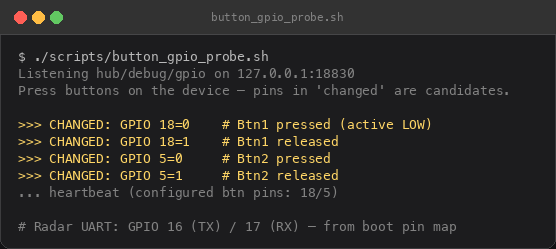
Illustrative button_gpio_probe.sh session — GPIO 18 / 5, active LOW.
Part 7: The Mac Daemon — asyncio, Not AppleScript Hell (Okay, Some AppleScript)
daemon/main.py starts everything in one process:
tasks = [
    asyncio.create_task(mqtt_loop(daemon), name="mqtt"),
    asyncio.create_task(discovery_loop(), name="discovery"),
    asyncio.create_task(daemon.display_loop(), name="display"),
    asyncio.create_task(daemon.standup_loop(), name="standup"),
    asyncio.create_task(start_ota_server(), name="ota"),
    asyncio.create_task(run_web(app), name="web"),
]
HubDaemon.handle_message is the central switchboard — radar samples fan out to mode handlers:
if topic == TOPIC_RADAR:
    data = json.loads(text)
    await insert_radar_sample(data)
    if self.mode in WORK_TRACKING_MODES:
        await self.work.on_radar(data)
    elif self.mode == "sleep":
        await self.sleep.on_radar(data)
    if self.mode == "media":
        await self.media.on_radar(data)
Work mode presence logic lives on the daemon, not the firmware — change standup interval without reflash. Away ≥4 of last 5 minutes → standup timer resets (radar flicker). Long press btn1 → manual reset.
Offline sync (sync.py) — daemon replays LittleFS batch, dedups by event ID:
async def should_skip_event(event_id: int | None) -> bool:
    last = await get_last_event_id()
    return event_id <= last

async def apply_event(daemon, event: dict, ...) -> bool:
    if etype == "presence" and mode in WORK_TRACKING_MODES:
        present = bool(data.get("present"))
        if present and not session:
            await start_session_at("work", ts)
        elif not present and session:
            await end_session_at(session["id"], ts)
NTP on ESP32 before timestamps; hub/sync/ack clears device buffer after successful replay.
Run everything:
./daemon/run.sh          # mosquitto + web :18080 + MQTT :18830 + discovery :18832
./scripts/flash_firmware.sh
./scripts/install_launchd.sh   # optional Mac login autostart
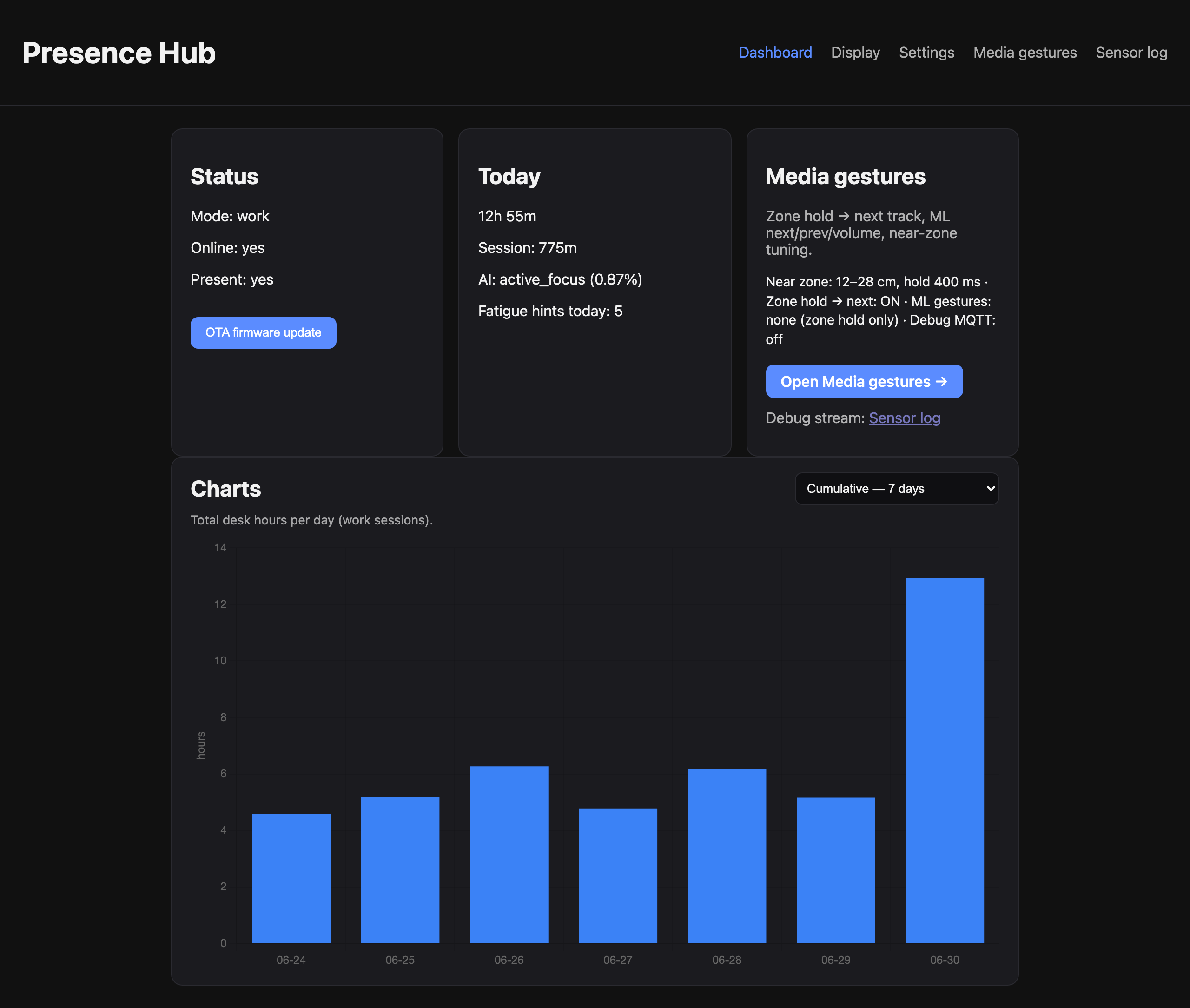
Local dashboard at 127.0.0.1:18080 — illustrative demo data; no vendor cloud.
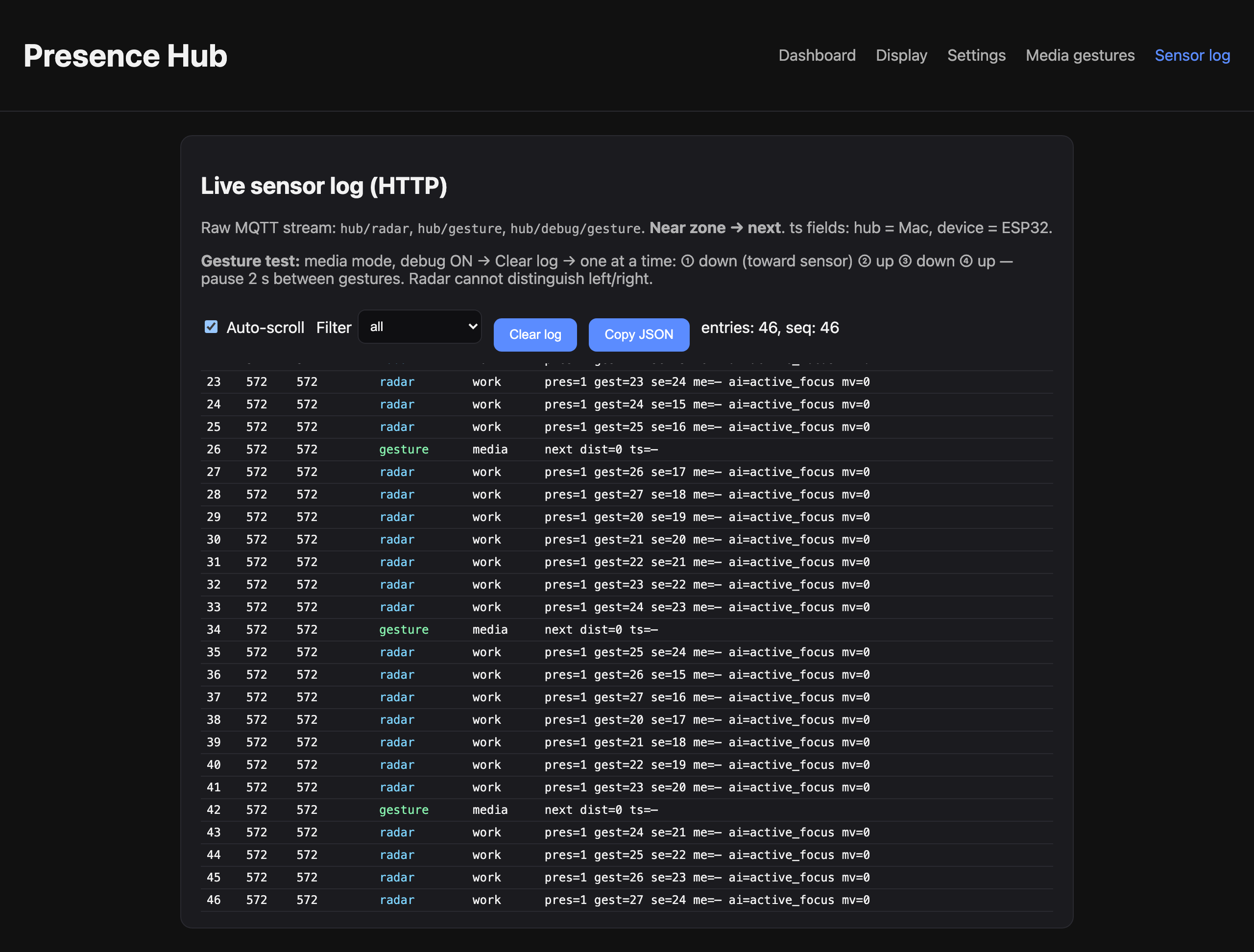
Sensor log — same LAN, same SQLite, same honesty policy as the charts.
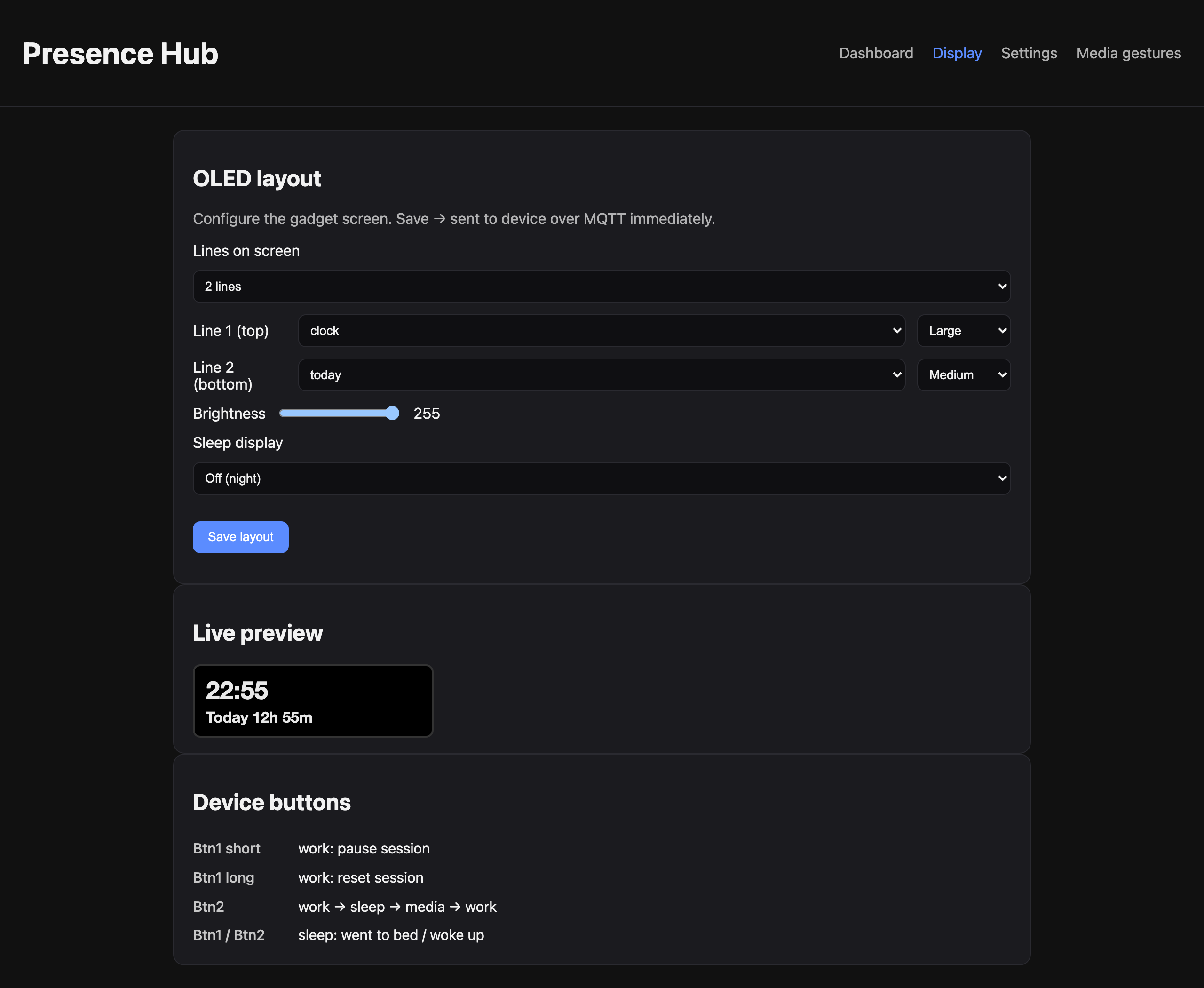
Display editor — display.html. Screenshot uses seeded demo data from render_hub_screenshots.py.
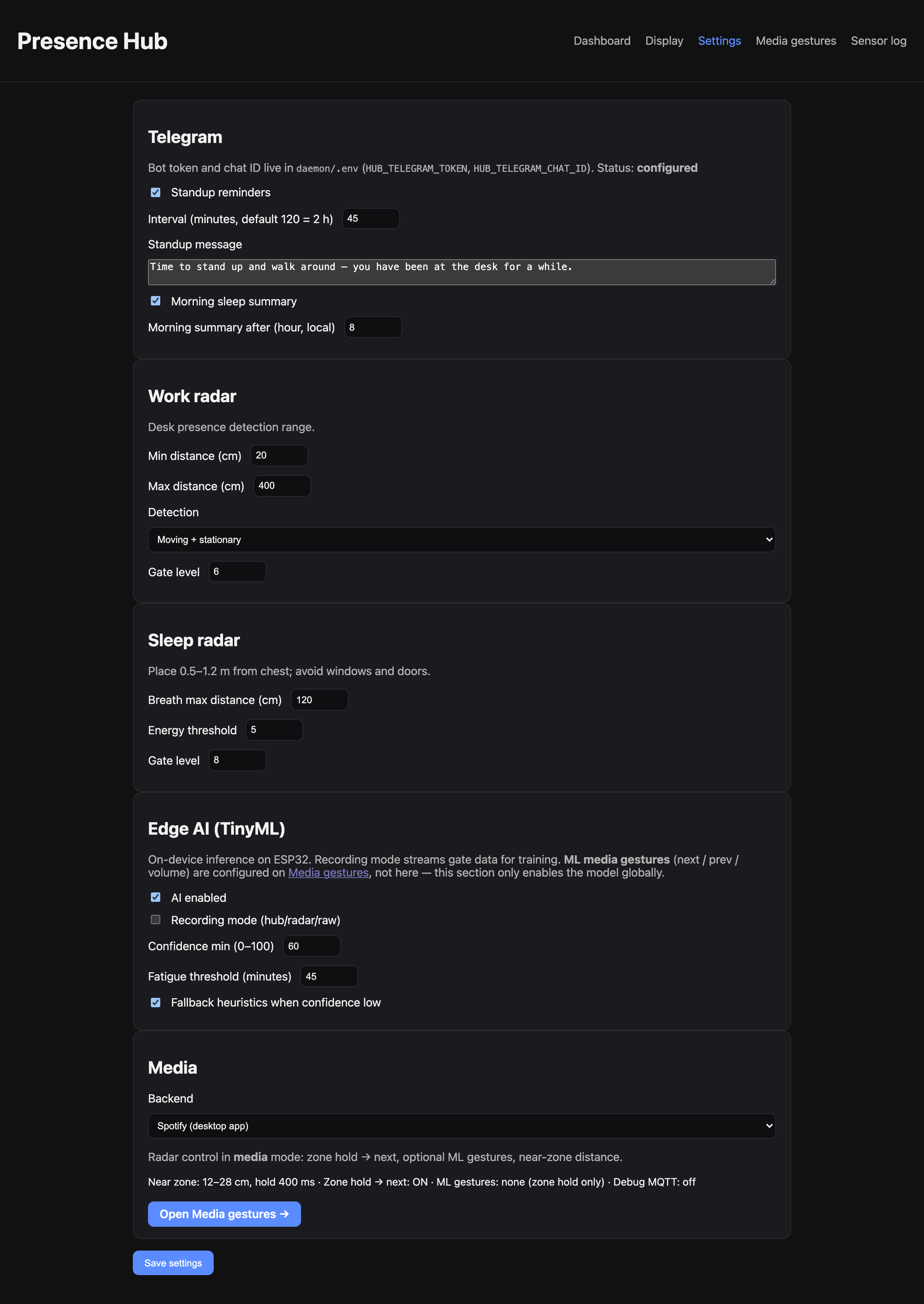
Settings page — radar, standup, TinyML globals, media backend. Illustrative demo session, not live desk stats.
Spotify — gestures on chip, policy on Mac
The LD2410 is one-dimensional: distance along the beam, not Minority Report hand poses. Controlling Spotify with OAuth on the ESP32 would be absurd (TLS + token refresh on 320 KB RAM).
Media mode publishes hub/gesture; MediaController runs AppleScript on the Mac:
async def _next_track(self, backend: str) -> None:
    if backend == "spotify":
        await self._osascript(
            'tell application "Spotify" to play next track',
            fallback_key=124,
        )
    else:
        await self._media_key(124)
Track metadata (artist, title, position) flows back to the OLED via display_engine → hub/display. Alternative backend: system media keys via System Events, with optional nowplaying-cli fallback.
Honest limits: Spotify must be installed; prev and hover-volume need TinyML calibration — zone-hold next is the production baseline.
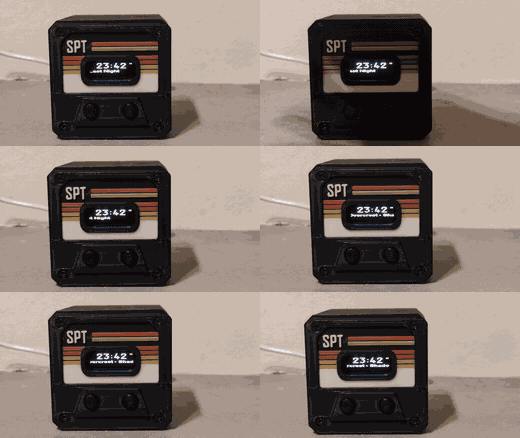
Real desk footage — hold in the near zone (~12–28 cm), Spotify skips track, OLED scrolls metadata from the Mac daemon.
Display engine — Spotify on the OLED
DisplayEngine builds widget lines every second; display_loop publishes to hub/display:
# media mode — track widget from AppleScript metadata
track = self.media.format_track_display()  # "Artist - Title  1:23/4:05"
return [{"pos": 0, "text": track, "font": "medium", "center": True}]
Flow: gesture → MediaController.on_gesture → AppleScript → refresh_track → display_engine → MQTT → firmware renders U8g2 text. Policy on Mac, pixels on ESP32.
Telegram bot — sample session
You: /status
Bot: Mode: work
     Online: yes
     Present: True
     AI state: active_focus
     Session: 2h 14m

You: /today
Bot: Today at desk: 5h 32m
     Fatigue hints (AI): 2

You: /update
Bot: OTA triggered: http://192.168.1.42:18081/firmware.bin
Standup logic on the daemon (work.py)
Why 4 of last 5 minutes absent resets the standup timer: radar flicker from fans or posture shifts should not spam stretch reminders. The firmware only reports physics; policy lives on the Mac so I can tune intervals in Settings without reflash:
for offset in range(1, 6):
    if not self._minute_had_presence.get(now_minute - offset, False):
        absent_minutes += 1
if absent_minutes >= 4:
    self.last_standup_at = datetime.now(timezone.utc)  # reset standup clock
Part 8: Firmware — Modes, MQTT, Offline Journal
Three modes, one radar, zero cloud:
| Mode | Button 2 | Button 1 |
|---|---|---|
| work | cycle mode | short: pause; long: reset session |
| sleep | → media | btn1: went to bed; btn2: woke up |
| media | cycle mode | gestures + work log continues |
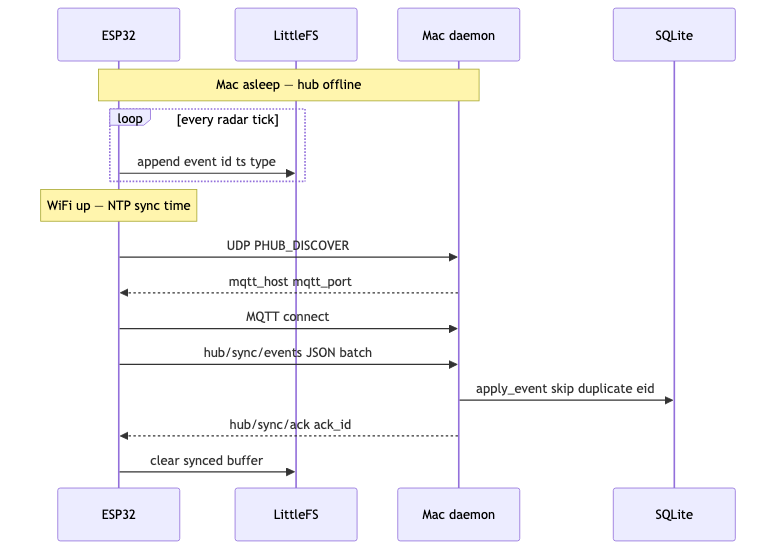
Offline buffer: ESP32 always appends events to LittleFS — presence, mode changes, buttons, gestures, sleep markers — even when the Mac is off. After Wi-Fi: NTP for real timestamps, UDP discovery, MQTT connect, batched hub/sync/events, daemon dedup by event ID, hub/sync/ack, buffer cleared.
EventLog::append writes JSON lines:
doc["id"] = id;
if (ts > 0) doc["ts"] = ts;
doc["type"] = type;
doc["mode"] = mode;
// data object serialized into LittleFS
Display uses U8g2, not LVGL — a 128×64 OLED does not need a scene graph; flash budget goes to radar + ML. Web layout editor pushes widget strings via MQTT; firmware only renders text.
Key MQTT topics:
| Topic | Role |
|---|---|
| hub/radar | Extended radar + optional ai_state, ai_confidence |
| hub/gesture | {type, value} → Mac media control |
| hub/display | Daemon → OLED widget lines |
| hub/config | Retained settings → ESP32 NVS |
| hub/sync/events / hub/sync/ack | Offline replay |
| hub/radar/raw | Full gate arrays (recording mode only) |
Offline sync — Mac asleep for 8 hours
Mini case study: laptop closed overnight, ESP32 still powered. Events append to /events.jsonl on LittleFS. Morning: Wi-Fi → NTP → UDP discovery → MQTT → batch sync → SQLite → ack → buffer cleared.
LittleFS line (representative):
{"id": 1042, "ts": 1719751200.5, "type": "presence", "mode": "work",
 "data": {"present": true}}
{"id": 1043, "ts": 1719754800.0, "type": "gesture", "mode": "media",
 "data": {"type": "next", "value": 22}}
``hub/sync/events`` batch (ESP32 → Mac):
{"events": [
  {"id": 1042, "ts": 1719751200.5, "type": "presence", "mode": "work",
   "data": {"present": true}},
  {"id": 1043, "ts": 1719754800.0, "type": "gesture", "mode": "media",
   "data": {"type": "next", "value": 22}}
]}
``hub/sync/ack``: {"ack_id": 1043}
OTA over LAN
Typical serial log after pio run + Telegram /update:
OTA from http://192.168.1.42:18081/firmware.bin
OTA OK, rebooting
Firmware v0.6.0
Radar ready
MQTT connected
ota.cpp uses ESP32 HTTPUpdate — same trust model as discovery (LAN HTTP, no vendor S3).
Part 9: Radar 101 — What the LD2410 Actually Sees
Before gestures and TinyML: physics.
The HLK-LD2410C is a 24 GHz FMCW presence sensor. In enhanced mode (what we use) it exposes:
- Distance to dominant target (cm)
- Moving and stationary energy per distance gate (typically 9 gates × ~20–75 cm steps)
- Boolean present / moving — useful but not authoritative in the near field
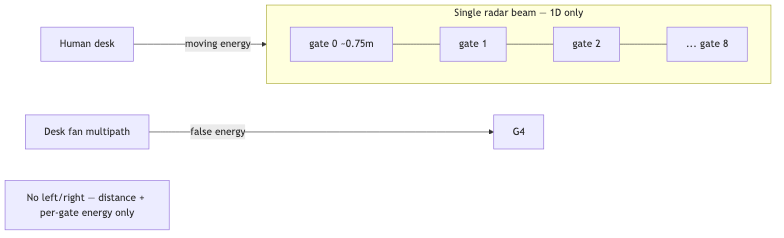
Enhanced vs basic: enhanced gives per-gate arrays (moving_gates[], stationary_gates[]) for ML and fan-noise filtering; basic mode is coarser distance + single energy — fine for a light switch, not for «focus scoring.»
Why ``present=false`` with valid ``dist``: near-field multipath (monitor stand, desk edge) decouples the vendor boolean from geometry. Presence Hub keys gestures off distance in zone, not present.
Desk fan false positive: moving blades pump energy into far gates with weak distance stability → rules-only «someone is here» breaks; TinyML class env_noise targets exactly this pattern (high m_energy variance, low s_energy variance).
Part 10: Gestures — Why I Fought Physics for Days (Not Weeks, I Swear)
The vendor's «Revolutionary Edge AI» was hardcoded threshold comparisons. Desk fan? False positive. Curtain? False positive. Their Medium article showed hands gliding through air like a conductor at the Philharmonic; the LD2410 is a single-beam ranger — one distance axis, per-gate moving/stationary energy. No left/right. No 3D pose. Product photography lied; physics did not. It felt like weeks because every «almost works» session ended with me staring at a distance graph at 1 a.m. In calendar time it was days — still long enough to develop opinions about multipath and a grudge against monitor stands.
What the sensor actually gives you
- Distance along the radar line of sight (~20 cm gate steps in gesture profile)
- Useful near field at desk: often 12–35 cm, heavily quantized
- present boolean often wrong in near field — distance is the honest signal
What I planned vs what shipped
Ambition: Minority Report. Reality: a ruler that sometimes lies about how far your knuckles are.
| Gesture | Idea | Outcome |
|---|---|---|
| Swipe in → next | Fast approach (Δdistance/Δt) | Hard — velocity is noisy 1D mush |
| Swipe out → prev | Recede | Harder — hand leaves beam faster; multipath fakes «approach» |
| Hover → volume | Stable distance → level | Medium — fan multipath breaks variance |
| Zone hold → next | Hand in 12–28 cm for 400 ms | Reliable — one bit of geometry + time |
After a few days of tuning (and several nights of «one more gate»), v1 shipped zone-hold → next only. Honest UX: treat next as production; prev/vol as «enable after calibration session — and maybe bring snacks.»
Why prev still feels broken (even in TinyML branch)
Physics is not symmetric; your hand leaving the beam does not owe you a clean retreat signal. Four reasons the «previous track» gesture remains a diva:
- Symmetric noise — retreat is weaker than approach (hand exits beam quickly).
- Multipath — monitor stand / desk edge creates fake approach more than retreat.
- Default ML weights are heuristic, not trained on your desk.
- Global debounce — rapid next→prev can lose.
Media radar tuning (radar.cpp): gesture profile → 20 cm gates, max gate 2, 8× poll/loop, 200 ms MQTT — temporal resolution for hold detection.
Zone-hold state machine — actual firmware (media_mode.cpp)
void MediaMode::fallbackZoneHold(const RadarReading &reading, GestureCallback cb) {
    const uint16_t d = gestureDist(reading);
    const bool inZone = inNearZone(d);  // default 12–28 cm

    if (!inZone) {
        zoneArmed_ = true;   // re-arm on exit — critical
        zoneEnterMs_ = 0;
        return;
    }
    if (!zoneArmed_) return;
    if (zoneEnterMs_ == 0) { zoneEnterMs_ = now; return; }
    if (now - zoneEnterMs_ < cfg.holdMs) return;      // 400 ms hold
    if ((now - lastNextMs_) < cfg.debounceMs) return; // 1200 ms debounce
    cb("next", static_cast<int>(d));
}
TinyML path calls handleMlGesture first; if confidence low, fallback zone-hold still runs:
void MediaMode::onRadar(..., const TinyMlResult *ai) {
    if (ai && ai->state != AiState::GestureNone)
        handleMlGesture(*ai, reading, cb);
    fallbackZoneHold(reading, cb);  // always available
}
Debug: gestures.html — live dist bar, zone overlay, hold countdown. MQTT hub/debug/gesture when debug on.
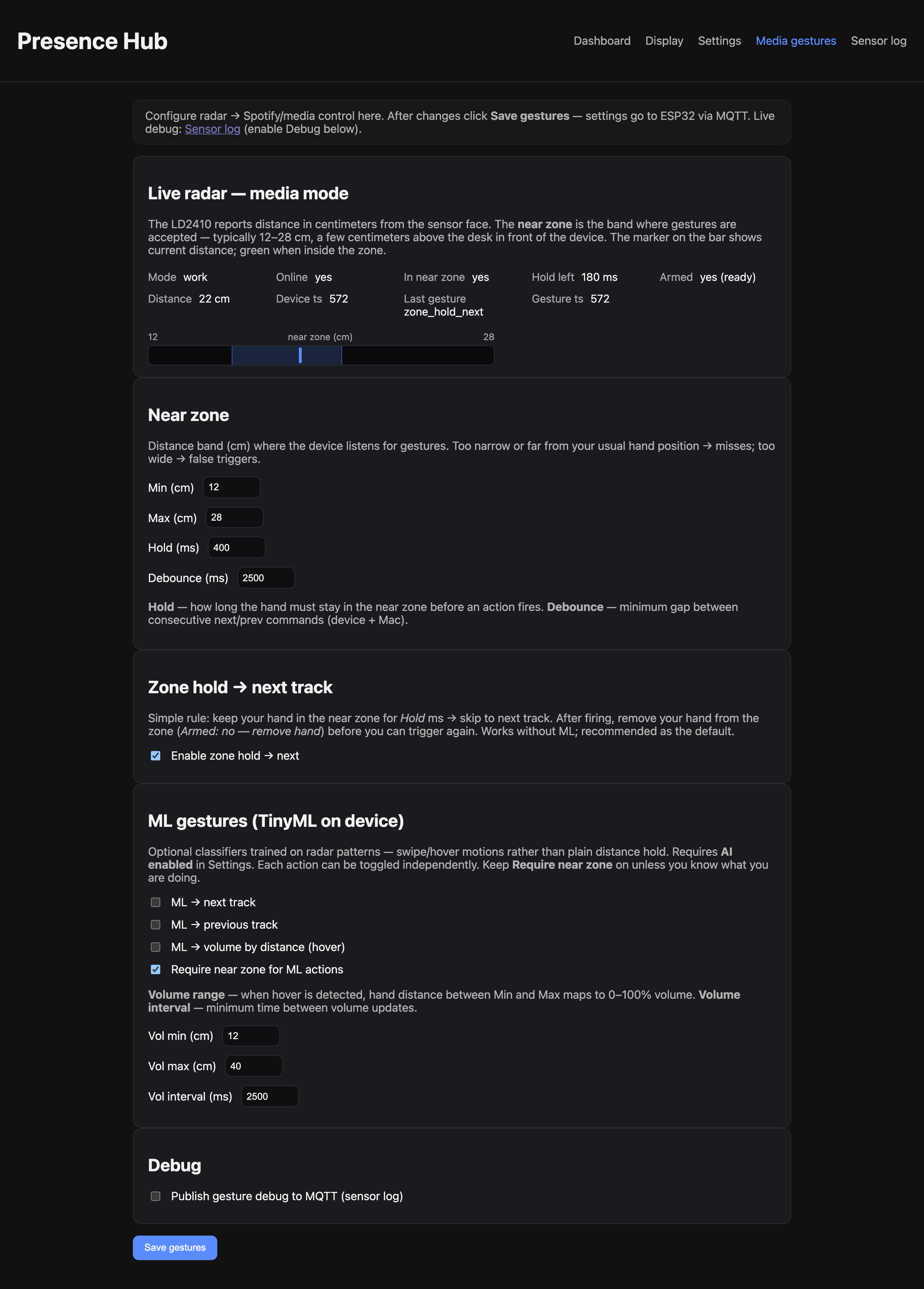
Gesture calibration UI — distance bar, zone hold, ML toggles. Seeded demo session from render_hub_screenshots.py — same UI, fake radar stream.
Part 11: Honest TinyML — Not the Medium Article
(Vendor «edge AI» marketing vs measured reality: Part 0.5 — Power Strip Lecture pull-quote.)
I added TinyML (firmware 0.6.0, feat/tinyml) because rules-only hit walls after liberation:
| Problem | Rules only | TinyML |
|---|---|---|
| Desk presence | Distance threshold | active / fatigued / vacant / env_noise (fan filter) |
| Gestures | Zone-hold → next | next / prev / hover from velocity + stability |
| Sleep | Fixed s_energy threshold | breathing_stable / restless / absent |
| Host bug | s_energy missing from MQTT (0.5.x) | Fixed pipeline + breath-rate estimate on Mac |
What I still refuse to claim: clinical sleep staging, 3D air gestures, ChatGPT-on-chip.
Why inline INT8 MLP — not TensorFlow Lite Micro?
The liberated stack already lived in Arduino / PlatformIO. TFLite Micro + ESP-NN would cost flash/RAM for marginal gain on a problem that fits a single hidden-layer MLP. My implementation: ~15–40 KB weights in model_data.h, <5 ms inference inline in loop() — no arena allocator, no dependency hell, full source in the repo. That is the kind of edge AI I can explain line-by-line on a bus ride.
Pipeline:
LD2410C UART → RadarReading (+ 9+9 gate energies)
     → FeatureBuffer (32 frames)
     → 16 features (variance, velocity, ZCR, gate centroid, cross-correlation, …)
     → INT8 MLP (model_data.h)
     → AiState + confidence
     → work / sleep / media handlers + MQTT hub/ai/state
Mac daemon does NOT run real-time inference — logs states, standup on fatigue, Spotify on gestures. Training is offline on Mac; chip runs inference only. Privacy + CPU budget.
16 features — interpretable, debuggable in sensor log (mirrors tools/ml/features.py):
| f# | Name (concept) | Meaning |
|---|---|---|
| f0 | mean_s_energy | Average stationary energy in window |
| f1 | var_s_energy | Stationary variance — stillness vs fan jitter |
| f2 | mean_m_energy | Average moving energy |
| f3 | var_m_energy | Moving variance — env_noise discriminator |
| f4 | mean_dist | Mean distance (cm) |
| f5 | dist_velocity | Δdistance/Δt (cm/s) — swipe classes |
| f6 | peak_m_gate | Gate index with max moving energy |
| f7 | peak_s_gate | Gate index with max stationary energy |
| f8 | m_gate_centroid | Energy-weighted moving gate center |
| f9 | zcr_s | Zero-crossing rate on stationary energy |
| f10 | cross_corr_ms | Moving/stationary correlation |
| f11 | present_ratio | Fraction of frames with presence flag |
| f12 | moving_ratio | Fraction of frames with moving flag |
| f13 | max_s_energy | Peak stationary energy |
| f14 | dist_std | Distance stability |
| f15 | spectral_centroid_s | Stationary energy vs gate index |
Recording mode CSV (hub/radar/raw → collect.py, 5 rows):
ts,dist,s_energy,m_energy,presence,moving,moving_gates_0,...
1719751200.12,84,18,4,1,0,2,1,0,0,0,0,0,0,0
1719751200.62,83,19,3,1,0,2,1,0,0,0,0,0,0,0
1719751201.12,85,17,5,1,0,1,2,0,0,0,0,0,0,0
Rules vs ML — desk fan scenario:
| Condition | Rules-only | TinyML (work head) |
|---|---|---|
| Fan on, chair empty | Often present=true (false positive) | env_noise or vacant after train |
| Seated, typing | active_focus if thresholds lucky | active_focus stable |
| Seated, frozen 45+ min | May still show present | static_fatigue → stretch hint |
Build budget (pio run — ESP32-D0WD, firmware 0.6.0): flash ~76% of 4 MB partition; RAM ~18% at runtime with ML enabled; inference <5 ms per 500 ms loop — no TFLite Micro arena.
out.values[0] = meanS;
out.values[5] = distVelocity();
// ... see tiny_ml.cpp extractFeatures()
INT8 forward pass:
for (uint8_t c = 0; c < classCount; ++c) {
    int32_t score = bias[c];
    for (uint8_t i = 0; i < inputCount; ++i)
        score += weights[c * inputCount + i] * (int32_t)features.values[i] / 32;
}
// argmax → state; confidence from score margin
Below confidenceMin → heuristic fallback (device usable day-one).
Export — tools/ml/export_model.py quantizes sklearn MLPClassifier to C arrays:
def quantize_matrix(matrix, scale=32.0):
    clipped = np.clip(np.round(matrix * scale), -127, 127)
    return [int(v) for v in clipped.flatten()]

# → static const int8_t WORK_WEIGHTS[...] in model_data.h
Training workflow
cd tools/ml && pip install -r requirements.txt

# Web Settings → Edge AI → Recording mode ON
python collect.py --output ../../datasets/raw.csv
python label.py ../../datasets/raw.csv --events-json events.json \
    -o ../../datasets/labeled.csv
python train_presence.py ../../datasets/labeled.csv -o models/presence_mlp.joblib
python train_gesture.py ../../datasets/labeled.csv -o models/gesture_mlp.joblib
python export_model.py --work-model models/presence_mlp.joblib \
    --gesture-model models/gesture_mlp.joblib
cd ../../firmware && pio run   # then OTA from daemon :18081
Resource budget (ESP32-D0WD): 15–40 KB flash (models), 8–20 KB RAM, <5 ms @ 500 ms period.
Honest limits:
- Not medical. Not EEG. Not left/right hands.
- Models improve only with your CSV from your desk layout, fan, monitor stand.
- Default model_data.h = heuristic weights until you train.
Future I did not ship (see ADVANCED_AI_ROADMAP.md): 1D-CNN on gate tensor, TFLite if flash tax worth it, gesture calibration wizard, Linux hub with MPRIS instead of AppleScript.
Appendix A — MQTT payload cookbook
Copy-paste shapes from mqtt_client.cpp / daemon — subscribe with mosquitto_sub -h 127.0.0.1 -p 18830 -t 'hub/#' -v.
| Topic | Example payload |
|---|---|
| hub/radar | {"dist":84,"s_energy":18,"m_energy":4,"presence":true,"moving":false,"ai_state":1,"ai_confidence":78,"ts":1719751200.5} |
| hub/ai/state | {"mode":"work","state":"active_focus","confidence":78,"ts":1719751200.5} |
| hub/gesture | {"type":"next","value":22,"eid":1043,"ts":1719751200.5} |
| hub/button | {"id":1,"event":"long","eid":1040} |
| hub/display | {"lines":[{"pos":0,"text":"14:32","font":"xlarge","center":true}]} |
| hub/config | {"gesture_zone_min_cm":12,"gesture_zone_max_cm":28,"ai_enabled":1} (retained) |
| hub/status | {"mode":"work","online":true,"version":"0.6.0","buffered":3,"pending_events":0} |
| hub/sync/events | {"events":[{...},{...}]} — see Offline sync above |
| hub/ota/trigger | {"url":"http://192.168.1.42:18081/firmware.bin"} |
| hub/radar/raw | {"dist":84,"moving_gates":[2,1,0,...],"stationary_gates":[5,3,1,...]} (recording only) |
Appendix B — Debug cheat sheet
| Symptom | Check |
|---|---|
| No MQTT | Discovery? hub/status heartbeat? Mosquitto :18830? |
| Wrong buttons | GPIO probe + button_gpio_probe.sh |
| Gesture fires twice | gesture_debounce_ms; leave zone to re-arm |
| Gesture never fires | Gestures page: dist in zone? Media mode? Debug on? |
| ai_state stuck vacant | Fan noise → record CSV, retrain; or lower ai_confidence_min |
| Spotify no-op | Spotify running? media_backend in Settings? |
| OTA fail | pio run built bin? Daemon up? Serial OTA failed: line |
| Sleep chart empty | s_energy in hub/radar; daemon running overnight? |
Part 12: Evolution Timeline
| Firmware | Milestone |
|---|---|
| 0.1–0.2 | MQTT hub, modes, SQLite, basic OLED |
| 0.3+ | UDP discovery, LittleFS offline sync |
| 0.4 | Near-zone gesture (next only), gesture debug UI |
| 0.5.1 | MQTT payload size fix (radar was silently dropped — a classic) |
| 0.5.2 | Single-line OLED font scaling |
| 0.6.0 | TinyML heads, experimental prev/vol/hover, AI dashboard |
What I would do differently
Hindsight after firmware 0.6.0:
- Gesture calibration wizard — record 50 swipes, one-click retrain; today it is manual CSV + label.py.
- mDNS alongside UDP discovery — broadcast JSON is fine on home Wi-Fi, but Bonjour would help multi-subnet nerds.
- Linux hub — MPRIS instead of AppleScript for Spotify; Mac-only was pragmatic, not eternal.
- TLS on MQTT — overkill on isolated LAN; worth it if the hub ever faces guest Wi-Fi.
- 1D-CNN on gate tensor — if flash budget allows; hand-crafted features were the right v1 trade-off.
Conclusion — Intent Is the Malware
Strip away GDPR, OpenAPI, mmWave gates, and INT8 weights. One question remains:
Who owns the device on my desk?
In the 90s we feared the computer under the desk. In the 2020s the threat sits on it — OLED smile, wellness branding, someone else's cloud on the other end of the wire.
Silicon is not evil. Intent is the malware. Harm lives in architects who ship MAC-as-identity into a home office and call it care.
I took ownership back — hostile hardware → accountable appliance:
- No external management view. No bathroom-break scoring. No timezone-as-GPS theatre.
- Stretch nudges, Spotify skips, offline journals — because I configured them, on my LAN, in my SQLite.
Know your digital rights. Protect your desk boundary. When «Edge AI» cannot survive a desk fan, read the flash first. When the spy box arrives as a «gift», say no — then, if you are an engineer, ship the alternative.
Presence Hub: same ESP32, same radar, my logs, my rules. The spy box asked for my outlet; I asked for my desk back. Source: Presence Hub on GitHub.
Epilogue — The Small Spy Box and the Big One
This story is small. One desk. One ESP32. One engineer who stopped being a user and read the flash.
But it sits inside a much larger shift — one I chose with a suitcase, not a thought experiment. I left an authoritarian despotism where surveillance is infrastructure, not a startup pitch — and found the same logic in a different badge: not a dossier, but a fleet table; not a street camera, but a mmWave module on the kitchen table.
In the 90s — the decade that formed many of us who learned computers through Norton Commander, BBS ethics, and the idea that information wants to be free — the bargain was at least argued in the open. Benjamin Franklin, already in the 18th century, had the formula:
«Those who would give up essential Liberty, to purchase a little temporary Safety, deserve neither Liberty nor Safety.»
We quoted it on forum signatures. We meant it. The strong of the world — states, platforms, employers — have since made a counter-offer: surrender a little more privacy each year, and we will call it security, productivity, care. Cameras in the lobby. Trackers on the desk. Models that score your attention. Logs that outlive your employment. The corporate spy box is not an aberration. It is imitation at startup scale: we are small incompetent technical shitheads, but we copy the architecture of control — and you will not hide from us on your home Wi-Fi either.
That is why the old hacker ethos — cypherpunk, BBS, information wants to be free — is not nostalgia. It is a design requirement: local, inspectable, owned by the person in the room. Open firmware. MQTT on your machine. SQLite you can delete. Models you train at your desk.
I do not know if that ethic has a political name in 2026. Maybe info-anarchy: no central landlord for your presence data. Maybe AI-anarchism in the narrow engineering sense: inference on your chip, weights you exported, no cloud priest interpreting your radar returns for HR. Not LLM messianism — just the stubborn idea that intelligence on the edge should serve the edge, not the org chart.
The spy box on my desk was a joke with a MAC address. The world building more of them is not a joke. The only honest response I know — the one this article and this repo are — is to take the hardware back, document the lie, ship the replacement, and keep the boundary where Franklin said it should be: you do not trade liberty for safety and expect to keep either.
And do not stay quiet about it. Call things by their proper names. Surveillance is surveillance, not «wellness.» Exploitation is exploitation, not «culture fit.» Abusers and exploiters — in the state, in the company, in the product brief — deserve to be named, not wrapped in OKR-friendly euphemism. The IT and AI age makes this worse, not better: the same hypocrisy, but smoother UI, a chatbot smile, and a privacy policy nobody reads. We have never needed more honesty about who gets hurt and who profits.
Watch people, not slogans. Look at what a system does to the human behind the MAC address — instead of hiding behind «we care.» Georgy Sadykov's The Face (Лицо, 1988) — watch it here — said it before desk trackers: bureaucracy grinding a person until the face they show is no longer their own. In 2026 the mask is an OLED and a radar module.
Do not be silent. Name the lie. Then build the alternative.
If this long read was useful — firmware, story, or both — you can support the work on BuyMeACoffee, ThanksDev, or DonationAlerts. More weird hardware, more honest ML, more articles that treat your desk as yours. Thank you.